
by Admin on April, 2016
In 1985, when the current specification of File transfer Protocol, RFC959, was written, no explicit definition was made for how an FTP server should present directory lists back to a client. Automated clients were not considered in the RFC and although most servers use a ‘common’ format, not all did.
Consequently, sometimes MOVEit Central doesn’t understand the information that is being returned to it from a directory listing. When this happens it is necessary to write a custom directory parsing script in Visual Basic. This is then imported into MOVEit Central and set in the host definition:
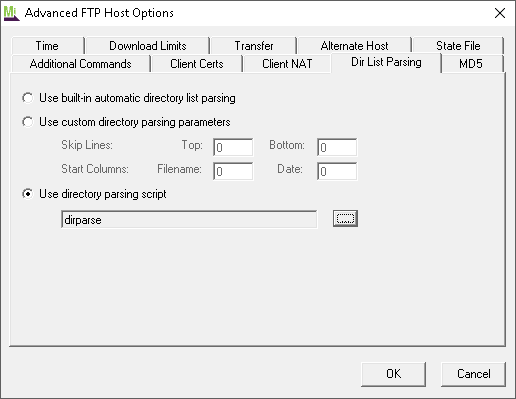
You can use the script to properly parse the directory listing, picking out only relevant data and returning just the files that you want.
In this example, blank lines and directories are being ignored: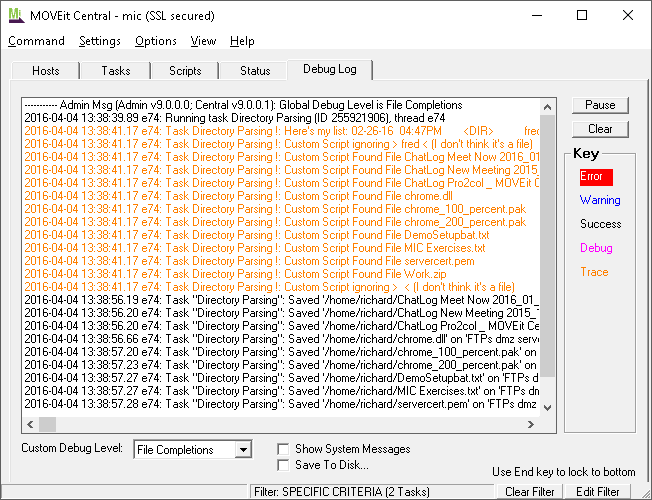
Technicians at Pro2col have extensive knowledge of the MOVEit Central application and can assist with the process of creating a bespoke script for you – either guiding your technicians or writing the script for you.
Don’t hesitate to get in touch on info@pro2colgroup.com / 0333 123 1240 for more information on setting this up for your MOVEIT Central environment.