Version 8.3.2 of Fortra’s Globalscape EFT was released on 30th January and brings with it a number of new features, enhancements, and bug fixes. Here’s our look at a few of them and our thoughts on why they may be useful to you.
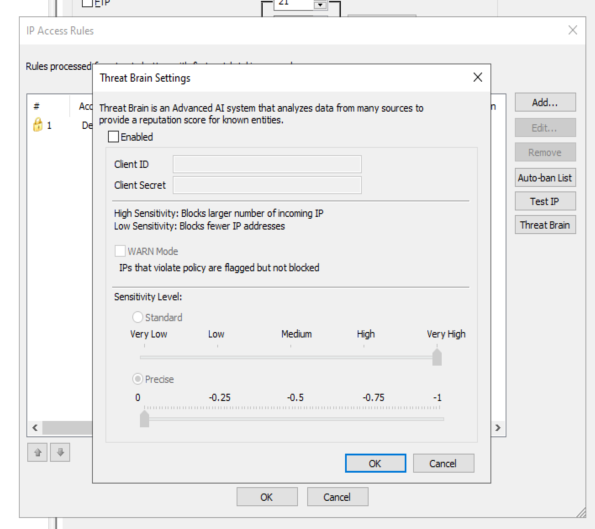
Fortra Threat Brain
Threat Brain is a threat intelligence platform, powered by AI, that looks at a number of sources across the internet, social media, other platforms, dark web etc. in order to identify (and subsequently block) bad actors before they attempt to penetrate EFT. In a way, it’s similar to IP blocking that already exists inside EFT, but on a global scale instead of a local one. For example, if another company using Threat Brain suffers a DOS attack, that source address will be shared with your system and the address will be blocked before any connection attempt is even made. Threat Brain is integrated into the admin UI, web admin console and REST API.
Web Admin Client
The Web Admin client has continued to be updated with extra functionality with the ability to manage administrators from the console aswell as regular users.
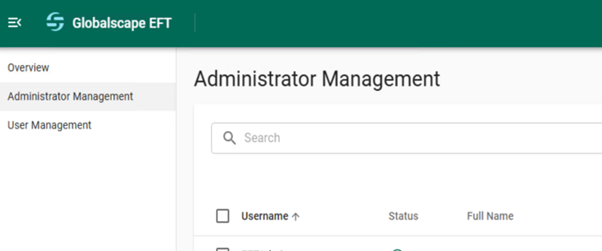
However, there is still a long way to go before the web admin client can replace the existing console.
Security
There are some interesting enhancements in this area, which are probably the most important parts of the release.
Globalscape EFT 8.3.2 now includes FIPS 140-3 support for both SSH and SSL. FIPS, or Federal Information Processing Standards, are a set of rigorous U.S. government computer security requirements used to validate cryptographic modules. With this update in Globalscape EFT 8.3.2, means organisations that require FIPS-compliant encryption can confidently use Fortra's Globalscape EFT Platform for secure file transfers.
Additional security enhancements include:
-
Both FIPS and non-FIPS SSL libraries have been updated
-
Prioritisation for SHA2-512 over SHA2-256 for outbound traffic (advanced property)
-
ARM now logs the SSH fingerprint of incoming connections
-
Warnings to administrators when using weak key lengths
-
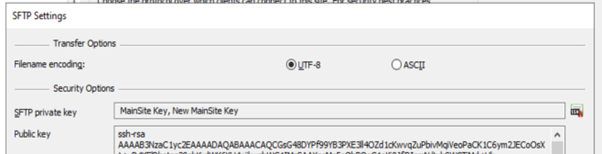
Support for multiple SSH keys per site
This last enhancement mentioned above may seem a little confusing, however it addresses a problem that we commonly see with our customers – how to handle migration from an old to a newer SSH key.
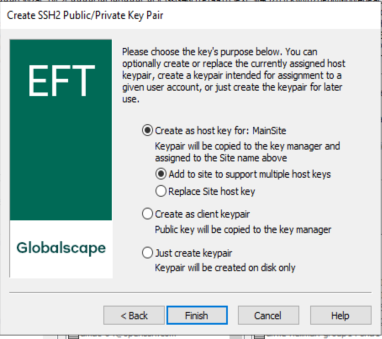
So, for example, if you currently have an RSA key, but need to switch to something newer and more secure, you could select an ED25519 key and have BOTH keys available. Clearly, when an external party connects, they may see either one or both keys as being acceptable, avoiding those awkward situations where EFT cannot be upgraded to support newer keys because it also need to support the older ones too.
Advanced Workflow Module
There are a few enhancements for the AWM, including an updated Bouncy Castle library. However, mostly the improvements are in the number of fixes for issues in the AWM (around 30), including correcting handling of FTP timestamps and issues with SQL decryption.
Summary of Enhancements in EFT 8.3.2
This release leans heavily into Threat Brain integration, which has already been integrated into GoAnywhere MFT very successfully. However, if this is not of interest to your organisation, consider instead the security improvements that this version also brings – FIPS 140-3 and the ability to have multiple SSH keys on a site. This last one alone should get the attention of anyone who is still supporting older SSH keys.
If you need assistance upgrading to Globalscape EFT 8.3.2 or want to ensure your deployment stays fully compliant with FIPS 140-3 and other regulatory standards, get in touch with us today to discuss how you can take advantage of the latest features while maintaining the highest levels of security and compliance.
|
About the Author |
|

|
Richard Auger is the Principal Technical Consultant at Pro2col, and has been working in the field of file transfer and middleware for around twenty years. He’s currently Pro2col’s lead Technical Consultant helping clients get the most out of their MFT solution. One of the reasons why Richard loves tech is his curious nature. Tech is constantly evolving, so he is always trying the latest tech releases and testing their limits. |