
Entra ID (formerly Azure Active Directory or Azure ID) is Microsoft’s cloud identity and access management (IAM) solution. It is widely used to manage user identities, authentication, group memberships and access to applications across an organisation.
Recently, we worked with one of our clients in the global language and localisation sector on a large-scale migration project. This particular request was just one small task of a much bigger initiative, involving multiple workflows and automations. Their requirement was to use Entra as the central point for managing their new client onboarding process. When a new customer was invited and added through Entra ID, the client wanted the appropriate account, permissions and access to be automatically generated in GoAnywhere MFT. Equally, if a user was removed from Entra, they wanted that change reflected in GoAnywhere without needing to manually intervene.
The challenge was that it’s not currently possible to directly synchronise Entra ID groups to GoAnywhere. In the near future, it is planned for this functionality to be part of the SAML login process, however, even then it is likely that this will only happen during the user login process. Without a native way of synchronising the two platforms, the client was facing a choice between manually managing users and permissions or building and maintaining custom scripts to handle the synchronisation. Neither option was particularly appealing given the scale of the project. But having worked with Pro2col on a number of other requirements throughout the migration, the client turned to us as GoAnywhere specialists to see whether there was a better way. The answer was yes.
You can achieve the same result using a workflow that automates the entire process, which we designed and built for this particular client. At a high level, the process is as follows (single group being selected):
-
Get the membership of the GoAnywhere group from a SQL query (“list #1”)
-
Get an Oauth token
-
Make a REST GET call to MS Graph to get the id of the group
-
Make a REST GET call to MS Graph to get the membership of the group (“list #2”)
-
Loop through “list #2” and for each entry:
- Create the user if it does not exist in GoAnywhere
- Check if the user belongs to the group via SQL query
- Add the user if it does not belong to the group
-
Loop through “list #1” and for each entry:
- Loop through “list #2” and for each entry:
- Check if “list #1” entry matches “list #2” entry
- If no match found, remove user from GoAnywhere group
- Loop through “list #2” and for each entry:
The whole workflow looks like this:
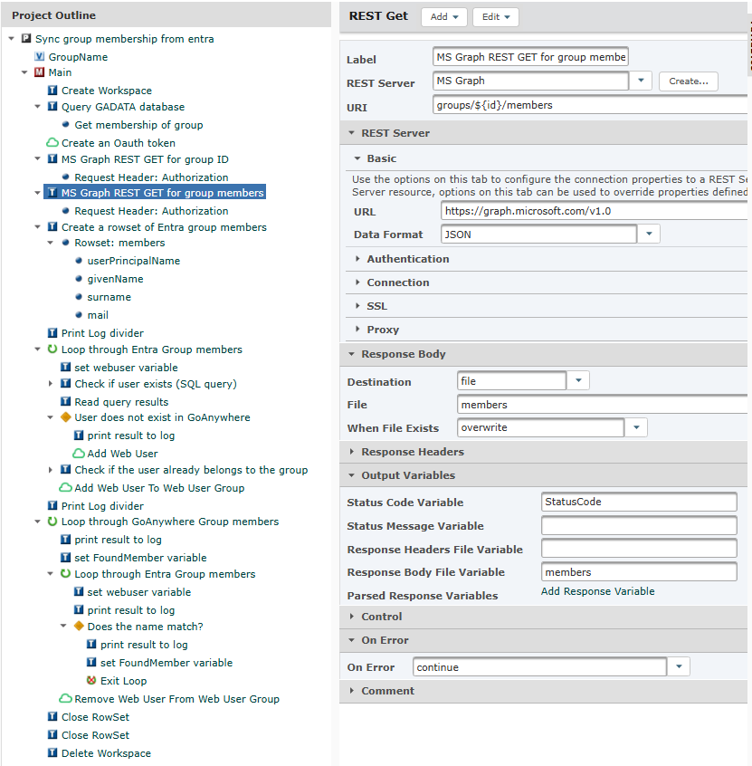
This project works with GoAnywhere webusers but can also easily work with administrator accounts. In this case, it’s important to note that there is no option in the GoAnywhere Command connector to add or remove users to/from groups – you must use the export/import group command instead.
Thinking of import/export, instead of a database query, it is also possible to export a webuser group and read the resulting XML file to get a rowset; however, the read-only database query is quicker and simpler to perform.
Interestingly, this wasn't a one-off requirement. Since then, we've seen similar requests from organisations in the pharmaceutical, biopharmaceutical and life sciences sectors. In some cases, the goal was automated user creation, while in others it was part of a Single Sign-On (SSO) project. And while this scenario focuses on synchronising GoAnywhere MFT groups to Entra ID, it highlights the flexibility of what’s possible using workflows and how they can be used effectively to bridge functionality gaps, and automate complex business processes.
At Pro2col, this kind of work is our bread and butter. We help organisations get more value from their Managed File Transfer environment by designing and implementing custom workflows, integrations, and automations tailored to the unique needs of every business.
Whether you’re looking to synchronise GoAnywhere to Entra, or something else entirely, there's very little our consultants haven't seen before. If you have a requirement that seems difficult, time-consuming, or simply isn't available out of the box, get in touch. There's a good chance we've tackled something similar before, and if not, we'd love the challenge.
|
About the Author |
|

|
Richard Auger is the Principal Technical Consultant at Pro2col, and has been working in the field of file transfer and middleware for around twenty years. He’s currently Pro2col’s lead Technical Consultant helping clients get the most out of their MFT solution. One of the reasons why Richard loves tech is his curious nature. Tech is constantly evolving, so he is always trying the latest tech releases and testing their limits. |